Southeast Asian Motifs: Design Tips for Beginners
Southeast Asian weaving motifs are known for their geometric patterns, bold colors, and cultural significance, making them a great source of inspiration for game skins. These patterns, often seen in textiles from countries like Indonesia, the Philippines, and Thailand, include shapes like diamonds, zigzags, and stylized animals. They can be used creatively on game assets like character outfits, weapons, and vehicles.
Here’s what you need to know:
- Why they work for games: Their repeating patterns and high-contrast colors are visually appealing and easy to adapt for digital designs.
- Common motifs: Designs often feature diamonds, hooks, and celestial or natural symbols like the naga (river serpent) or birds.
- Colors: Indigo, red, yellow, and white are common, with each color carrying specific meanings.
- Respecting origins: Avoid using sacred or ceremonial designs. Focus on everyday patterns or geometric elements instead.
- Technical tips: Use tileable canvases, test patterns on 3D models, and ensure clarity at different scales.
Researching and Analyzing Southeast Asian Motifs
Identifying Motifs by Region and Tradition
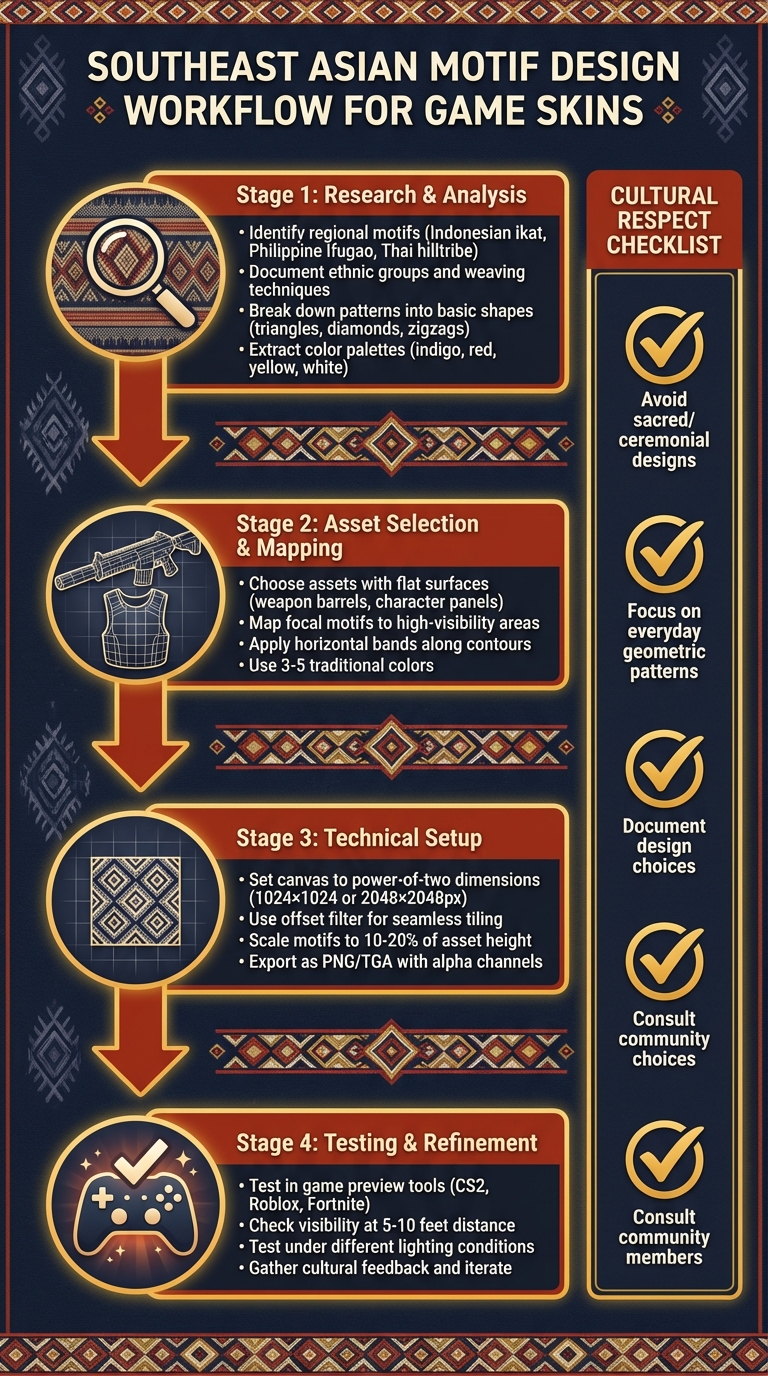
When exploring Southeast Asian textiles, it’s essential to recognize the distinct traditions tied to specific regions. For instance, Indonesian ikat from Borneo - especially Iban warp ikat - features bold zigzags and diamond patterns in reddish-brown hues, achieved using dyes from mangrove bark and the samak tree. Meanwhile, Philippine Ifugao and Cordillera textiles highlight strong stripes and geometric bands. On the other hand, Thai and Lao hilltribe fabrics, such as those from the Hmong, Mien, and Akha groups, are characterized by deep indigo backgrounds adorned with batik or intricate embroidery. Sumba and Timor textiles stand out with their large central animal motifs and finely woven tapestry borders.
Pay attention to structural and stylistic details. Warp ikat, for example, is identified by its blurred dye edges, while tapestry bands maintain sharp, clean lines. Motif sizes also vary - some textiles feature prominent central designs, such as animals or spiritual figures, while others rely on intricate, all-over geometric patterns. Color is another regional marker: hilltribe textiles often emphasize indigo, whereas brighter reds and yellows dominate Indonesian and Philippine traditions.
Documenting each region is crucial. Include reference images, details about the ethnic group, weaving techniques, and key motifs. Understanding the textile’s purpose - whether for rituals, warrior attire, or everyday use - provides insight into its cultural significance and ensures respectful application in modern designs, like game assets. Once motifs are identified, break them down into repeatable elements for digital adaptation.
Breaking Down Patterns and Layouts
Step back and examine the overall layout of the textile. Many Southeast Asian designs are structured around horizontal bands, vertical stripes, or central panels. Simplify these patterns by overlaying the image and breaking down complex forms into basic shapes like triangles, diamonds, hooks, crosses, and zigzags, which are common in Batak, Iban, and Timor textiles. Symmetry is another key feature - some motifs mirror along a vertical axis (as seen in animal and spirit designs), while others rely on rotational symmetry or simple left-to-right repeats.
Focus on isolating a single "unit tile" - for example, a naga curve, a diamond cluster, or a hook pattern - that repeats throughout the design. This step is crucial for scaling motifs onto game elements like weapons, armor, or character outfits. Common layout structures include horizontal bands (ideal for gun barrels or sleeves), central panels with borders (perfect for chest armor or shields), and all-over repeating grids (great for seamless tiling on backpacks or vehicle panels). With these simplified shapes and symmetry in place, align the designs with culturally appropriate color schemes.
Color Palettes and Symbolism
Color plays a significant role in Southeast Asian textiles, often carrying deep cultural meaning. For example, Hmong, Mien, and Akha hilltribe textiles frequently feature dark indigo backgrounds paired with white resist patterns or vibrant embroidery accents. Iban and other Borneo warp ikats lean toward reddish browns, blacks, and muted yellows derived from natural dyes. Timor and Sumba ceremonial and warrior textiles emphasize reds, yellows, and blues in their tapestry designs.
When adapting these textiles for digital use, sample base hues directly from reference images. Adjust the saturation or brightness slightly to ensure the colors remain clear under game lighting while preserving the contrast between dark backgrounds and bright details. Be mindful of color symbolism - yellow and brown, for instance, were historically reserved for Buddhist monks' robes in Thailand, Cambodia, and Burma, carrying strong religious significance. Similarly, reds and browns in Iban textiles are tied to ritual use during significant social and spiritual events. Avoid using colors or combinations tied explicitly to sacred or funerary contexts in ways that could trivialize their meaning.
Finally, bring your reference color palettes and simplified motif tiles into Alive Games for Skins (https://alivegames.io) to test tile placement, scaling, and overall design on game-ready templates. This iterative process ensures your designs stay visually consistent and technically polished.
Designing Game Skins Inspired by Southeast Asian Motifs
Selecting the Right Game Asset
When designing game skins, start by picking assets with large, flat surfaces or defined contours that can showcase repeating patterns without distortion. For example, weapon barrels are ideal for linear motifs like nagas (river serpents), while geometric borders fit well on character clothing panels. Picture a CS2 rifle skin or a Fortnite outfit - bold motifs can stand out beautifully on these clear surfaces.
Pay attention to high-visibility areas such as weapon grips, character torsos, or vehicle hoods. Symmetrical assets, like cloaks or shields, work particularly well with repeating tribal patterns such as Iban zigzags. On the other hand, highly curved surfaces can be tricky unless you're using curvilinear okir motifs from Mindanao, which naturally complement rounded forms. Once you've chosen your asset, carefully plan the placement of motifs to create the most striking visual impact.
Mapping Motifs Onto Assets
Once you've selected the asset, focus on placing motifs in a way that enhances both visibility and gameplay aesthetics. Position focal motifs in prominent areas - think ancestor spirits or eagle (huong) protectors on a weapon's sight or a character's chest. Use geometric borders to trace seams and edges, creating a cohesive look. For instance, on a Roblox character jacket, you could position naga serpents along the arms to mimic the flow of a river, with hong birds perched at the shoulders. For vehicle hoods, try centering elephant-lion siho motifs for a bold centerpiece.
Incorporate horizontal bands or borders that align with the asset's contours, respecting traditional weaving practices where motifs often serve as guardians. Place symbols like the diamond centers from Kalinga Silambituwon stars on key focal points, framing them with linear borders. Studying historical textiles can provide inspiration for adapting these traditional designs to modern assets.
Simplifying Patterns for Readability
To ensure your designs are clear and effective in gameplay, simplify intricate patterns by emphasizing their key shapes. For example, reduce complex siho details to bold silhouettes with three to five color layers - using traditional hues like indigo and jackfruit yellow while preserving symbolic elements like naga curves. Negative space can be a powerful tool to make motifs like hong birds stand out against their backgrounds. Always test your designs at different scales to ensure they remain sharp and readable during gameplay.
Stick to a limited palette of three to five colors drawn from traditional schemes - earthy tones paired with vibrant contrasts. Simplify woven details to avoid clutter, while still capturing the essence of handwoven imperfections through authentic geometric patterns. Tools like Alive Games for Skins (https://alivegames.io) allow you to import UV templates, drag motifs onto focal areas, and auto-tile borders along seams with real-time previews, making the design process even smoother.
Technical Tips for Game Skin Creation
Setting Up a Tileable Canvas
Start with a square canvas using power-of-two dimensions like 1024×1024 or 2048×2048 pixels. These sizes are ideal for engines such as Unity and Unreal, as they support efficient mipmapping and optimize GPU memory usage. To ensure your design tiles seamlessly, use your graphics editor's offset filter (in Photoshop: Filter > Other > Offset) to shift the image by 50% both horizontally and vertically. This reveals any mismatched edges, allowing you to blend them smoothly. Extend repeating motifs to mimic the continuous flow of traditional patterns, like those seen in Batak or Dayak warp ikat textiles.
This method eliminates visible seams when your design wraps around 3D models, such as weapon barrels or character outfits. Tools like Alive Games for Skins (https://alivegames.io) simplify this process with built-in tileable canvas options and automatic seam blending. You can even preview your patterns in real time, skipping the need to switch between multiple programs. Once the canvas is seamless, adjust the scale of your design to ensure it looks clear and effective in various in-game scenarios.
Scaling and Testing Patterns
After making your canvas tileable, the next step is scaling your design for optimal in-game visibility. Downscale your texture to 25–50% to simulate how it will appear at typical viewing distances. Intricate details, like tiny ancestor figures or fine batik lines, may blur or become unrecognizable when viewed from 5–10 feet away in games like Counter-Strike 2. To maintain clarity, keep key motifs at 10–20% of the asset's height - for example, 100–200 pixels on a 1024px canvas. This ensures the design remains visible and engaging even at close range.
Test multiple scale variations of your pattern using your engine's 3D preview or UV viewer. Pay close attention to curved surfaces, such as rifle grips or character joints, where textures may stretch. Prioritize bold, simple shapes - like diamonds, zigzags, or bands - over intricate details to preserve the symbolic essence of traditional motifs while ensuring they remain readable during gameplay.
Exporting and Integrating Skins
When exporting your designs, use PNG or TGA formats with power-of-two resolutions (512×512 to 4096×4096). Include alpha channels for transparency and maintain an 8–16 bit depth to capture vibrant traditional colors, such as deep indigo or jackfruit yellow. Use clear and consistent file naming conventions, such as "ak47_weave_1024_color.png", and adopt a versioning system to simplify updates and iterations.
Platforms like Alive Games for Skins make exporting even easier, offering one-click export options in native game formats for supported titles. You can design tileable patterns, preview them directly on 3D models in your browser, and export ready-to-use files without relying on additional software. Once exported, test the skins in game-like environments and from various angles to confirm that your motifs remain sharp and visually appealing.
Finalizing and Testing Your Designs
Testing Designs in Game-Like Environments
To see how your skin design performs in action, load it into the target game's workshop or preview tool. For example, you might use CS2's workbench, Roblox Studio, Fortnite Creative, or a Minecraft resource pack viewer. This step helps you evaluate how your Southeast Asian-inspired motifs hold up under actual gameplay conditions. Pay attention to how the design looks from different perspectives: first-person view for fine details, third-person view for overall silhouettes, and a distance of about 5–10 feet to ensure smaller elements remain visible. Test the design through various animations - like reloading, running, or idling - to catch potential issues, such as moiré patterns.
Also, test your skin under different lighting setups, such as daylight, overcast skies, shadows, and highlights. This is especially important for traditional colors like deep indigo, which can shift noticeably when rendered with PBR (physically based rendering) materials. Ensure that key motifs, such as geometric diamonds or naga-inspired borders, remain distinct and visually clear across these conditions. These tests will guide your next round of design tweaks.
Iterating Based on Feedback
Once you've tested your design, refine it using targeted feedback. Share screenshots or short gameplay clips with teammates, players, and - if you're working with Southeast Asian motifs - community members or cultural consultants. Their input can help ensure your design feels respectful and avoids stereotypes. Ask specific questions like, "Is the main motif clear at mid-range?", "Does the pattern look too busy during movement?", or "Are there any cultural elements that seem off?" Organize the feedback into categories such as readability, color contrast, cultural accuracy, and technical issues.
From there, make focused adjustments - one to three changes per category is a good starting point. For instance, you might "enlarge the naga-inspired border by 25%", "simplify the color palette to align with traditional designs", or "replace a vague animal figure with a geometric motif based on documented weaving patterns." After each change, test the updated design and share before-and-after comparisons with your reviewers. This ensures your revisions address concerns while preserving both the cultural and aesthetic essence of your work.
Documenting Your Design Choices
As you refine your design, keep a detailed record of your decisions. This documentation will help maintain consistency across future projects. Include visual references like photos of textiles, museum artifacts, or pattern diagrams. Note the cultural context, such as the origin ("Tboli t'nalak" or "Iban pua kumbu"), the meanings of motifs (e.g., whirlpool kusikus or protective figures), and any sacred patterns you chose to exclude. Record your color palette with precise hex or RGB values, along with descriptive labels like "Deep indigo base inspired by Hmong textiles." Add technical details like resolution, tiling settings, UV layout, export format, and engine configurations.
To make your documentation even more useful, include test screenshots showing both successful and problematic scaling for quick reference. If you're part of a team or working on a collection, store this information in a shared repository. This ensures that future designs inspired by Southeast Asian motifs stay consistent and respectful, while also streamlining the creative process for everyone involved.
CS2 Skin Creation Tutorial 1: Resources + Texturing
Conclusion and Key Takeaways
Designing game skins inspired by Southeast Asian weaving motifs requires a mix of creativity and cultural sensitivity. To start, dive deep into the region's traditional patterns and adapt them thoughtfully for modern game assets. Focus on simplifying bold geometric shapes - like zigzags, grids, or circles - while keeping their symbolic essence intact. Don’t forget to test how these designs interact with lighting and gameplay elements to ensure they look great in action.
When moving from research to design, choose a clear and focused motif. Begin with a single geometric element, such as a whirlpool-like kusikus grid or a star pattern inspired by silambituwon. Apply this motif to a specific game asset, like a weapon or character skin. Tools like Alive Games for Skins make this process easier by offering a web-based editor, customizable templates, and direct export options. These features let you map tileable patterns, test scaling, and integrate your designs seamlessly - no extra software required.
Throughout the design process, respect cultural heritage by documenting your creative choices and understanding the origins of the patterns you use. Steer clear of replicating sacred or restricted designs, and instead, draw inspiration from general geometric rhythms and traditional color palettes like deep indigo or bold contrasts. By blending thoughtful research with streamlined design tools, you can create game skins that are visually compelling and culturally respectful. This approach allows you to honor tradition while bringing fresh ideas to the table.
FAQs
How do I create culturally respectful game skins inspired by Southeast Asian motifs?
To design game skins that honor Southeast Asian motifs, begin with in-depth research into the meanings and historical context of the designs. Take the time to understand the deeper significance of specific patterns and symbols, ensuring they aren’t used in ways that might come across as stereotypical or disconnected from their origins.
Whenever possible, collaborate with community members or consult cultural experts. Their insights can guide you in creating accurate and respectful designs, helping to avoid unintentional missteps. This careful process not only demonstrates respect but also brings a genuine sense of connection and depth to your creations.
How can beginners incorporate Southeast Asian motifs into game skin designs?
To design game skins that draw inspiration from Southeast Asian motifs, start by simplifying complex patterns to make them clear and visually appealing in digital formats. Incorporate bold and vibrant colors that reflect the region's rich traditions, ensuring they stand out in the gaming environment. Translate traditional weaving textures into high-contrast digital designs for better visibility and impact within the game. It's essential to dive into the history and symbolism behind these motifs to ensure they are represented accurately and respectfully. Additionally, using user-friendly tools can streamline the customization process, especially for those new to design.
What are some tips for choosing colors and patterns for game skins inspired by Southeast Asian textiles?
When creating game skins influenced by Southeast Asian textiles, focus on using bold, earthy tones that echo traditional aesthetics. Think rich reds, deep blues, and warm natural browns - colors often seen in the region's textile art. These hues can set the foundation for designs that feel both striking and authentic.
Incorporate patterns that emphasize symmetry and repetition, as these are key elements in many tribal weaving traditions. These intricate designs not only add visual appeal but also reflect the cultural artistry behind them.
It's crucial to respect the cultural meaning embedded in these patterns. Steer clear of overly simplified or generic designs that might dilute their heritage. Instead, pay attention to the fine details that make these textiles unique. By doing so, your game skins can honor their origins while bringing something visually compelling to the table.