Best Roblox Skin Creator Tools for Fast Outfit Mockups
Need the best roblox skin creator for quick outfit previews? The best ones are simple, fast, and flexible. You might be testing shirt ideas for a game, trying avatar styles before spending Robux, or putting together custom looks as part of a bigger modding workflow that also includes CS2, FiveM, or GTA content, which can get messy fast. In any of those cases, the right tool saves a lot of time.
The top options were reviewed for speed, ease of use, editing flexibility, and how helpful they are for creators who want more than basic dress-up. That matters even more now because players and developers keep making more custom content, and not just in Roblox. Many of them are looking for online design tools that work across different game communities instead of being limited to one narrow setup.
This guide compares four good options for fast Roblox outfit mockups. It is meant to help with choosing a roblox skin editor that actually fits the workflow, whether that means casual creating, Roblox-focused design, or building assets for multiple multiplayer games. For anyone working across several games, a faster tool can make the whole process much easier.
What You’ll Find in This Roblox Skin Creator Guide
- Alivegames
- Catalog Avatar Creator
- Roblox Avatar Editor
- Sloyd AI Avatar Creator
Roblox Skin Creator Tools to Try
1. Alive Games
Homepage](https://seozillastorage.blob.core.windows.net/images/users/1024/images/screenshots/www.alivegames.io__1783566275132.png)
At a Glance
Alive Games is the strongest all-around choice for creators who need more than a basic Roblox outfit preview. Its biggest plus is the focus on customizable game assets and templates, so moving from an idea to a mockup takes less time and less setup. For Roblox clothing concepts, visual testing, or projects that also involve communities like CS2, CS:GO, FiveM, and GTA, it supports a broader creative workflow than tools made only for Roblox. For anyone looking for speed, flexibility, and a process that can grow over time, it’s the best place to start.
Core Features
- Roblox clothing and skin design templates
- Online editing for fast mockups
- Tools for custom game assets beyond Roblox
- Support for creators making multiplayer game content
- Simple template-based design process
- Useful for shirts, clothing concepts, and visual testing
- Built for solo creators and studios
Pros
- Fast start: Template-based tools help turn an idea into a visible mockup without wasting time on setup.
- Broader workflow: It goes beyond one game, which makes it helpful for modders and developers active in different communities.
- Creator-friendly design: The platform is easier to get into than many more complex asset pipelines.
- Good for iteration: Outfit ideas and visual directions can be tested quickly before full production, which can save a lot of time.
- Useful beyond casual styling: It works well for players, server owners, and studios that need custom assets with real workflow value.
Who It’s For
This tool fits Roblox creators, game developers, modders, and custom-content teams that want a practical design workflow instead of a simple in-platform avatar dresser. It also suits people working across Roblox, CS2, FiveM, and GTA projects who want one place for quick asset mockups and design testing, especially if they are managing several projects at once.
Unique Value Proposition
Alive Games stands out because it connects quick visual mockups with actual game-asset creation. Many tools in this space are limited to basic outfit previews, while others lean too much into technical 3D systems. Alive Games sits in a more useful middle ground. It gives creators a faster way to build and test ideas while still leaving room for more serious design work. That makes it a better match for users who want a roblox skin creator but also need room to grow, repeatable workflows, and support for other game ecosystems.
For creators comparing broader workflows, the guide on Best Online Design Tools for Game Skin Mockups also covers platforms built for multi-game asset creation.
Real World Use Case
Picture a small Roblox creator team planning a clothing drop while also getting branded visuals ready for a FiveM server. Instead of jumping between separate tools, they can use Alive Games to make Roblox outfit mockups quickly, refine the style, and keep the larger asset workflow organized in one system. That becomes especially helpful once deadlines start stacking up and the work needs to stay organized.
Pricing: Contact for pricing
Website: https://www.alivegames.io/
2. Catalog Avatar Creator
At a Glance
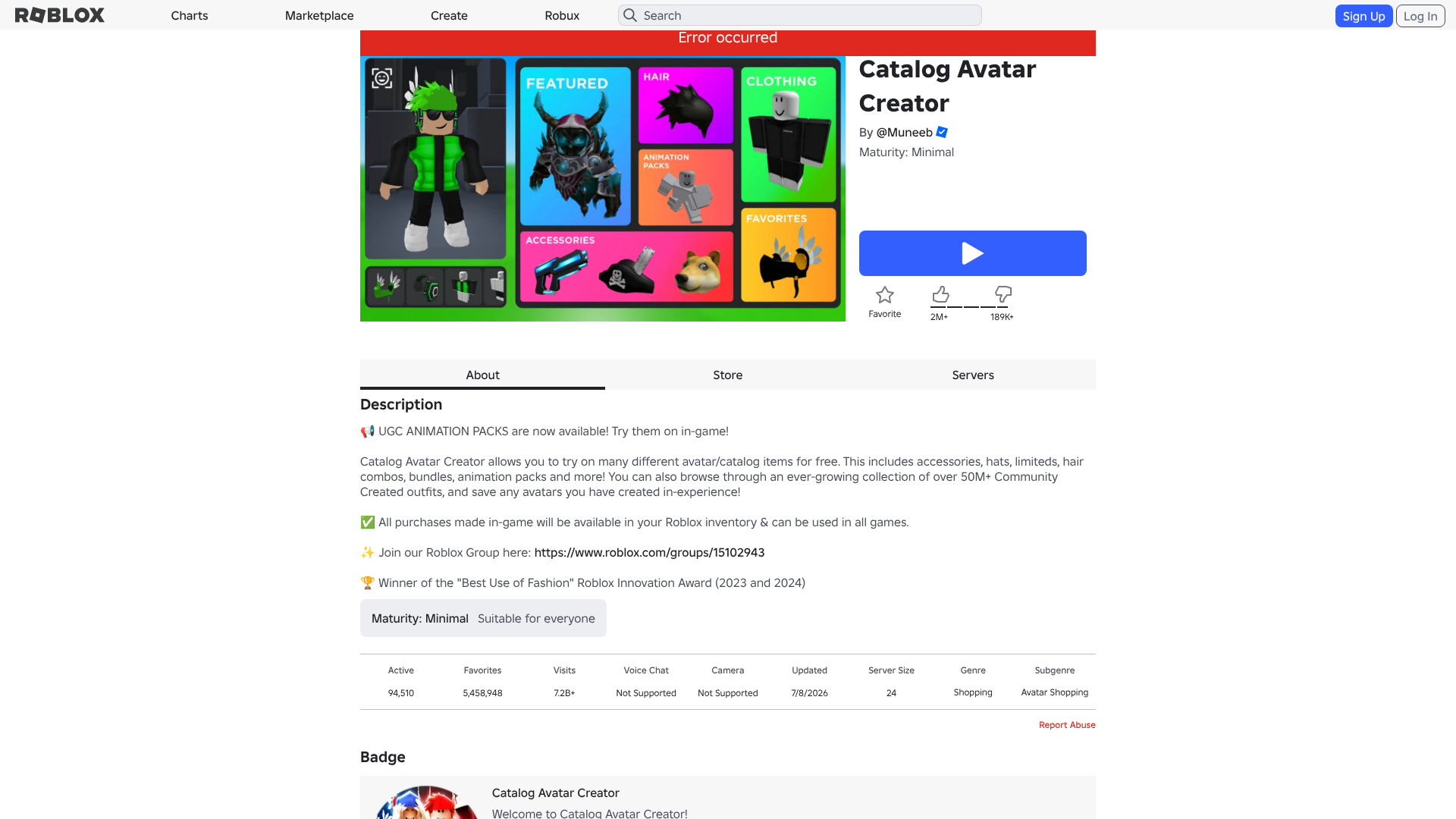
Catalog Avatar Creator is a popular pick for quick outfit mockups inside Roblox. It’s built for trying on items, mixing looks, and previewing styles before buying anything. For many Roblox players, that makes it a very practical choice. It’s not a full outside design tool, and it isn’t trying to be. Instead, it works especially well for anyone who wants something fast, familiar, and easy to use. If the main goal is quick visual testing with real Roblox catalog items, it’s one of the closest options out there.
Core Features
- Try on avatar items before purchase
- Build outfit combinations quickly
- Save outfit ideas
- Share looks with others
- Native Roblox environment
- Wide range of catalog-based styling options
Pros
- Very fast previews: Great for seeing full outfit ideas in just a few minutes.
- Roblox-native feel: It works in a space many players already know, which makes it easier to use right away.
- Strong community adoption: A lot of people use it, so it feels familiar and easy to trust.
- Good for shopping decisions: It can help avoid spending Robux on items that don’t look good together.
Cons
- Limited design depth: It’s much better for trying on items than for making original assets.
- Platform-bound: It’s not the best choice for export flexibility or for working across multiple games.
- Less useful for dev pipelines: More advanced creators may outgrow it pretty quickly.
Who It’s For
This option fits Roblox players and casual creators who mostly want to preview outfits fast. It works well for people focused on shopping, styling, or sharing avatar looks inside the Roblox world, so it’s pretty easy to get into. It’s a simple, direct tool for that kind of use. Teams building custom content workflows outside Roblox will probably find it less useful.
Unique Value Proposition
Its biggest strength is speed inside the Roblox experience itself. Users can test lots of outfit ideas without leaving the platform, which is the main draw here. For easy mockups using live catalog items, that convenience gives it a clear edge.
Additionally, creators looking for more advanced clothing workflows can compare these systems with the ideas covered in Roblox Shirt Design: Tools vs. Traditional Methods.
Pricing: Free access; item purchases depend on Roblox catalog pricing
Website: https://www.roblox.com/games/7041939546/Catalog-Avatar-Creator
Allow advertising and social cookies to watch embedded videos.
3. Roblox Avatar Editor
At a Glance
Roblox Avatar Editor is the official first-party option built right into Roblox, which makes it the most trusted and simple place to equip clothing, accessories, bundles, and animations. Because it’s part of the platform, compatibility issues are rarely a concern. In practice, it works best as a wardrobe manager. That makes it a better fit for organizing and updating an avatar than for full creative mockup workflows as a roblox skin editor. It handles the basics very well, but it’s still less flexible than tools made more directly for creators, and that becomes pretty obvious after a little use.
Core Features
- Official avatar customization
- Equip owned clothing and accessories
- Use bundles, animations, and native wardrobe tools
- Direct marketplace compatibility
- Always aligned with Roblox platform systems
Pros
- Official tool: It’s the safest and most reliable choice for platform support.
- Easy access: Roblox users don’t need to download anything extra, and there’s not much of a learning curve.
- Direct compatibility: Owned items and marketplace content work smoothly without much friction.
- Good for simple edits: It works well for quick wardrobe updates and account-level avatar changes.
Cons
- Basic mockup experience: It isn’t built for wide visual experimentation.
- Less fun for discovery: Compared with creator-focused tools, it feels more practical and a little plain, with less room for creativity.
- Locked to Roblox systems: Outside the Roblox platform, it doesn’t offer much value.
Who It’s For
Regular Roblox users get a clean, official place to edit an avatar here. It also suits players who care more about reliability and platform support than advanced design features or cross-game asset workflows. For anyone who just wants to change what an avatar is wearing without extra setup, it handles that easily.
Unique Value Proposition
Its official status is still the biggest advantage. For native support, easy access, and fewer compatibility concerns, Roblox Avatar Editor is the default option. It feels simple, stable, and familiar, so it’s easy to start using. The tradeoff is that it doesn’t have the same creative depth as stronger mockup-focused tools.
For users trying to improve workflow efficiency, Roblox Clothing Editor Tips to Avoid Upload Issues explains some common problems creators run into.
Pricing: Free access; many items require Robux
Website: https://www.roblox.com/my/avatar
4. Sloyd AI Avatar Creator
At a Glance
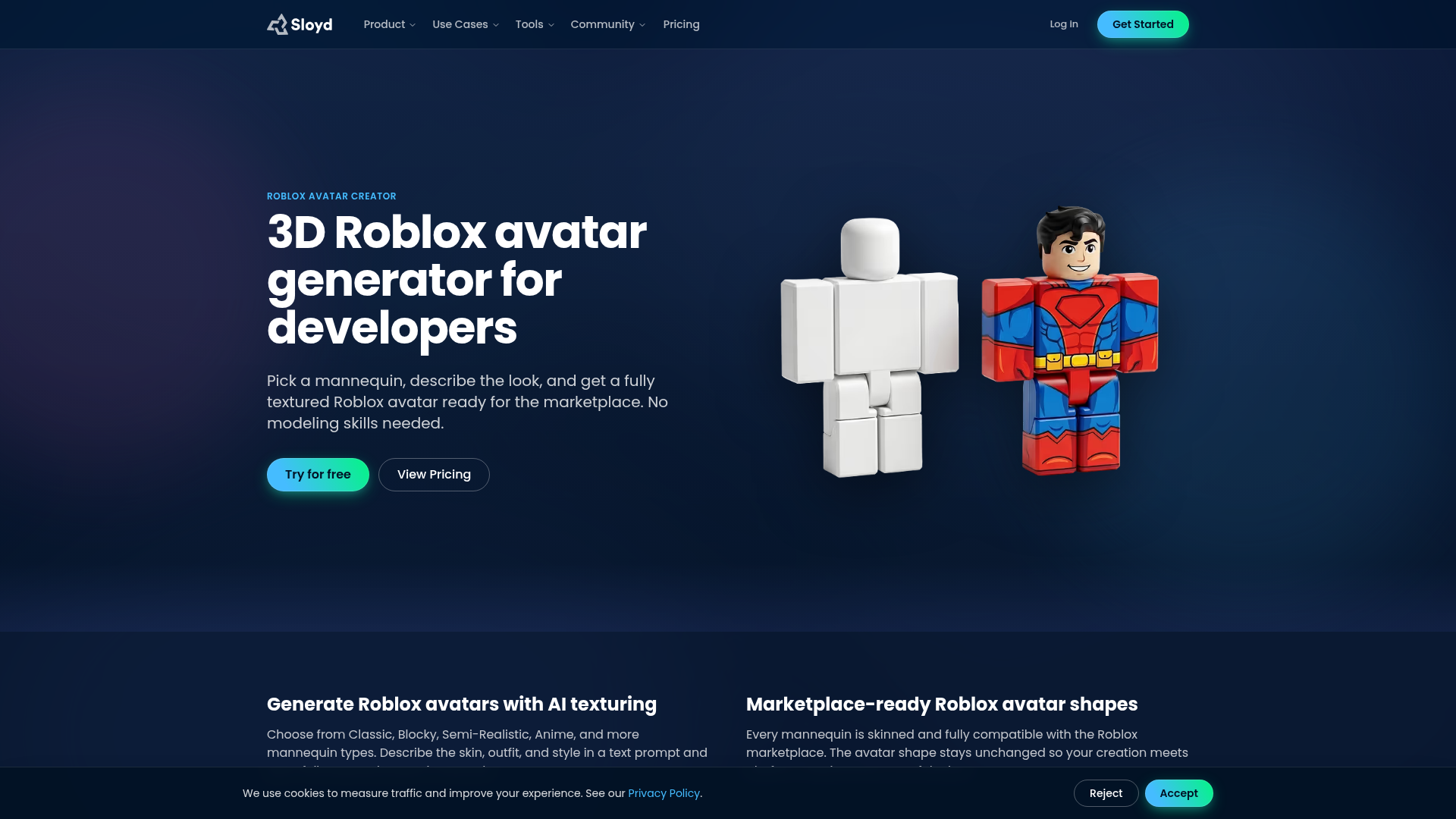
Sloyd AI Avatar Creator takes a different approach. It is not built around outfit try-ons inside the platform. Instead, it uses AI-assisted workflows to help users create 3D avatars and export files such as GLB. That makes it more advanced, and also more technical. For developers and serious creators, that can be a big plus. Casual users who only want to preview a shirt-and-hat combo, though, may feel like it is more tool than they really need.
Core Features
- AI-assisted avatar generation
- Text-prompt-based creation workflow
- 3D asset generation
- Exportable files like GLB
- Useful for Roblox Studio-related workflows
- Better for concept creation than simple styling
Pros
- AI speed: Prompt-based creation can save time during early concept work.
- Advanced outputs: More useful for developers than basic try-on tools.
- Export potential: Helpful in workflows that need files outside a single platform.
- Strong idea generator: Good for exploring visual directions quickly, which is especially helpful early on.
Cons
- Higher complexity: New users may need some time to learn it.
- Less native for players: It does not feel as direct as Roblox-based tools.
- Pricing unclear: Public pricing details are not always easy to confirm quickly.
Who It’s For
Sloyd is a better fit for advanced creators, developers, and technical users who want AI-assisted concept creation rather than simple avatar styling. It also makes more sense for production-minded teams. Casual Roblox players who just want a fast outfit preview will probably be happier with something simpler.
Unique Value Proposition
Its biggest advantage is the mix of AI-driven creation and export options. That makes it useful for people who need more than a wardrobe editor. It gives a starting point for 3D asset development tied to Roblox-related workflows, especially for teams building that kind of pipeline.
Moreover, teams experimenting with AI-assisted concepts may also find AI Texture Generators for Roblox Skin Design useful for early mockup work.
Pricing: Check website for current plan details
Website: https://www.sloyd.ai/avatar-creator
How Roblox Skin Creator Tools Compare at a Glance
The differences show up fast when the choice really comes down to speed or flexibility. Some tools are better for quick Roblox outfit previews, while others are a better fit for creators who want a repeatable content pipeline that saves a lot of time. Here’s a side-by-side view.
| Company | Key Features | Pros | Cons | Pricing |
|---|---|---|---|---|
| Alivegames | Templates, online editing, Roblox clothing workflows, multi-game asset support | Flexible workflow, fast mockups, cross-game value, creator-friendly, scalable | None | Contact for pricing |
| Catalog Avatar Creator | Try-ons, outfit building, save and share looks, Roblox catalog integration | Fast previews, easy to use, Roblox-native feel, strong community adoption | Limited original design depth, platform-bound, less ideal for dev pipelines | Free access; item pricing varies |
| Roblox Avatar Editor | Official avatar editing, accessories, bundles, animations, native wardrobe management | Official support, easy access, seamless compatibility, simple edits | Basic mockup tools, less creative discovery, Roblox-only value | Free access; many items require Robux |
| Sloyd AI Avatar Creator | AI avatar generation, text prompts, 3D exports, creator workflow support | AI speed, export options, advanced outputs, strong for concepting | More technical, less native for casual players, pricing less clear | Check website for current pricing |
Those differences are even easier to see in the table. Catalog Avatar Creator works well for quick styling inside the platform, and Roblox Avatar Editor is the official, safer choice. Sloyd gives users more technical control. Alivegames stands out for people who want speed, ease of use, broader design value, and a more complete option overall, especially if they need more than basic outfit edits.
It also helps to think about these tools by workflow. Casual users usually want to try on items quickly. Developers and modders tend to care more about reusable assets, custom templates, and flexibility across different projects. In that kind of setup, a platform like Alive Games is more useful than a tool focused only on Roblox wardrobe edits.
Why the Right Roblox Skin Creator Tool Matters for Fast Mockups
A good mockup tool does more than make avatars look cool. It helps people make better choices faster. For Roblox shirt designers, clothing drops, roleplay servers, or branded game content, every revision takes time, and yeah, that adds up fast.
A better roblox skin creator gives creators space to try ideas before spending money, publishing assets, or settling on a full design direction. It’s easy to miss, but it can save a lot of extra work later.
This category also connects with other communities. A lot of creators don’t stay in just one game, so the same person designing Roblox clothing might also be working on CS2 visuals, FiveM uniforms, or branding for GTA multiplayer. Narrow tools can slow the whole process down.
Flexible online design tools save time because they fit how modern creators actually work: switching between projects, testing ideas, and moving quickly without wasting hours on mockups.
For example, creators handling multiple pipelines may also benefit from reading Top Tools for Game Asset Design in 2026: Software for Skins, Clothing, and Decals for broader workflow comparisons.
Ready to Build Better Roblox Outfit Mockups?
Finding the right tool can be frustrating, honestly. Some options work well for trying on catalog items but fall short for real design work. Others have lots of power, yet they feel too technical when all you want is to test ideas fast. If speed matters but you also need room to create, it helps to use a tool that gives you both quick testing and more flexibility.
Alivegames ranks first in this comparison because it deals with the biggest issues creators run into: slow concept testing, scattered tools, limited workflows, and setups that only go as far as basic avatar styling. It is not just useful for previews, especially once someone is building more than a single look. Beyond showing how an outfit might look, it supports a more practical design process for creators focused on custom assets, repeatable mockups, and wider game content creation.
For anyone looking for a practical starting point for Roblox outfit design, and a platform that can keep up as projects grow, visit https://www.alivegames.io/ and explore what it offers. For creators who need more than a basic preview tool, it is a good place to start.
Frequently Asked Questions
What should I look for in a Roblox skin creator tool?
Focus on speed, ease of use, editing flexibility, and whether the tool fits your actual workflow. If you only want to preview catalog items, a Roblox-native option may be enough. If you need templates, custom asset support, or a broader creation workflow, a platform such as Alive Games may be a better fit.
How do I know if a roblox skin editor is effective?
A good tool should help you create clear outfit previews fast, make changes without friction, and reduce wasted time or Robux. The best ones also let you compare styles easily and support repeat work if you design often.
Are these online design tools free?
Some are free to access, especially Roblox-native options like Catalog Avatar Creator and Roblox Avatar Editor. But many still involve item purchases through Robux. More advanced platforms may use custom or business pricing depending on their feature depth.
How long does it take to make a usable outfit mockup?
For simple previews, it can take only a few minutes. If you are using templates or trying on existing items, the process is very fast. More advanced tools may take longer at first, but they often save time later through better workflows and reuse.
Which types of users benefit most from advanced mockup tools?
Game developers, modders, server owners, UGC-focused creators, and teams making branded in-game content benefit the most. These users usually need more than basic outfit previews because they are testing concepts, building assets, or working across multiple games.
Is an official Roblox tool always the best option?
Not always. Official tools are great for compatibility and simple account-level editing, but they are not always the strongest for creative experimentation. If your goal is deeper design work or multi-game content creation, a more flexible tool can be the smarter choice.