FiveM peds: how outfits, male and female models and clothing work
What a ped is, how the male and female freemode peds differ, how an outfit is built from parts, and why some clothing and body parts clip.
9 min read
Updated
PedsDressing a character in FiveM looks simple until a jacket makes an arm vanish. To understand why, you need to know what a ped is, how the male and female freemode peds differ, and how an outfit is put together from separate pieces that were never checked against each other. This guide explains all three, so you can dress characters and make custom clothing that fits.
What is a ped in FiveM?
Ped is short for pedestrian: any character model in the game. Your player is a ped, and so is every passer-by. FiveM sets a player's ped by its model name. The full list of models is in the FiveM ped models reference (opens in a new tab).
# Story and NPC peds: a fixed look, a small wardrobeplayer_zero            # Michael, one of the story characterss_m_y_cop_01           # a police officer
# Freemode peds: the GTA Online characters, with the big wardrobemp_m_freemode_01 # malemp_f_freemode_01 # femaleThe male and female freemode peds
The two freemode peds are separate models. Their clothing is separate too: every item exists for one of them. A top for the male ped is not in the female ped's files, and the number of items is different on each.
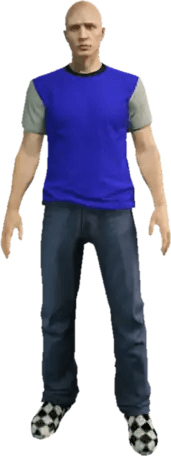
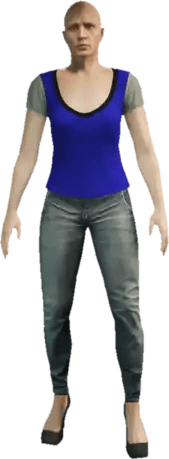
| Male | Female | |
|---|---|---|
| Model | mp_m_freemode_01 | mp_f_freemode_01 |
| Props | mp_m_freemode_01_p | mp_f_freemode_01_p |
| File prefix in packs | mp_m_ | mp_f_ |
| Items | Their own list and counts | Their own list and counts |
You can browse the clothing for each ped on the FiveM male clothing and FiveM female clothing pages. Each update's clothing also arrives under its own ped name, one for components and one for props. These are real names from the Alive catalogue:
# Clothing of the male freemode pedmp_m_freemode_01                              # the base gamemp_m_freemode_01_male_freemode_beach          # an older update's packmp_m_freemode_01_mp_m_executive_01            # a newer update's pack
# Props (hats, glasses, watches) live in their own pedmp_m_freemode_01_p                            # the base game's propsmp_m_freemode_01_p_male_freemode_beach        # an older update's props
# The female ped has its own set, with mp_f in place of mp_mmp_f_freemode_01mp_f_freemode_01_pBecause the counts change from one ped to the next, you never hardcode a maximum. You ask the game how many items a slot has, as in the How to add custom clothing to your FiveM server guide.
How an outfit is built: components, props, drawables and textures
An outfit is a list of choices, one per slot. A component is a slot on the body, a drawable is the item in it, a texture is its color and a palette is a tint. Props are the slots for hats, glasses and the like, with their own numbers.
| Code | Component ID | Body part |
|---|---|---|
| head | 0 | Head |
| berd | 1 | Masks |
| hair | 2 | Hair |
| uppr | 3 | Arms and torso |
| lowr | 4 | Legs |
| hand | 5 | Bags and parachutes |
| feet | 6 | Shoes |
| teef | 7 | Neckwear: scarves, chains, ties |
| accs | 8 | Undershirts |
| task | 9 | Armor and vests |
| decl | 10 | Decals |
| jbib | 11 | Tops and jackets |
This is the number you pass as the second argument of SetPedComponentVariation(ped, id, drawable, texture, palette) (opens in a new tab).
| Code | Prop ID | Body part |
|---|---|---|
| p_head | 0 | Hats and helmets |
| p_eyes | 1 | Glasses |
| p_ears | 2 | Earrings |
| p_lwrist | 6 | Watches |
| p_rwrist | 7 | Bracelets |
Props have their own numbering, used with SetPedPropIndex(ped, id, drawable, texture, attach) (opens in a new tab). A few more ids exist but servers rarely use them.
local ped = PlayerPedId()
-- component = the slot, drawable = the item, texture = the color, palette = a tintSetPedComponentVariation(ped, 11, 12, 2, 0)   -- slot 11 (top): item 12, color 2
-- props use their own numbers, and -1 takes the prop offSetPedPropIndex(ped, 1, 5, 0, true)           -- slot 1 (glasses): item 5, color 0ClearPedProp(ped, 0)                          -- take the hat off
Servers save an outfit as exactly those numbers. This is what one looks like, with example values. Because they are only numbers, changing the order of packs can change what a saved outfit shows.
-- 1. The model first: changing it resets the whole look-- 2. The face: head blend, features, overlays (not clothing)-- 3. The clothes, with the top before its torso-- 4. The propsHow the body parts stack
The game doesn't dress one body. It draws a set of pieces, one per slot, each made by an artist for a purpose. This is how they sit, from the body outward. It is a simplified map, to show who sits on whom.
from the body outward (roughly)
 8   undershirt          ← under the top 3   torso and arms      ← pairs with the top 11  top or jacket 9   body armor          ← over the top 7   neck items          ← around the collar 5   bag or parachute    ← on the back 10  decals              ← printed on the top
and apart from those: 4 legs 6 shoes 2 hair 1 mask props: hats, glasses, ears, watches, braceletsWhy some clothing and body parts clip
Clothing clips when pieces that weren't made together overlap. Skin pokes through a sleeve, a vest sinks into a jacket, or a hat drives hair out of the top. These are the pairs that cause most of it, and each has a fix you can test.
| Pair | Why it clashes | What to do |
|---|---|---|
| Top and arms11 and 3 | They are two separate pieces drawn together. A top is made for the arms piece that fits its sleeves and gloves. A different one can poke through the sleeve or make the arms disappear. | Set the torso that was made for the top. Check it with the best-torso data below. |
| Undershirt and top8 and 11 | The undershirt sits under the top. A bulky one under a tight top pokes through, and some tops aren't made to show one at all. | Pick a thin undershirt, or none, for tight tops. Test the combinations players will actually wear. |
| Body armor and top9 and 11 | Armor is a thick layer over the top. Bulky jackets and wide sleeves can clip through it. | Test your top with and without armor, and keep the shape close to the body where you can. |
| Bag and top or armor5 with 11 or 9 | A bag sits on the back, right where a hood, a collar or a thick jacket sits. | Test with a hood or a high collar, and with armor on. |
| Neck items and top7 and 11 | Scarves, chains and ties are close to the collar. Neck items can sink into a collar, or float above it. | Try the neck items players would wear with your collar shape. |
| Hair and hats or masks2 and prop 0 or 1 | Hair is its own piece. A helmet or a mask is drawn over it, and hair can poke through when nothing hides it. | Test with long and short hair. Some items can hide hair themselves, if their author set it up that way. |
| Legs and shoes4 and 6 | Trousers can be made to sit over the shoes or tucked in. Boots with wide trousers are the usual clash. | Test the trousers with boots, sneakers and heels, and watch the hems. |
These are common causes, not hard rules. Whether a pair clips depends on the exact items, so test the real combination.
Put items together on a 3D ped
Build an outfit from the catalogue on a male or female ped, and look at the combination before you make a pack.
 Miscellaneous
 Shoes
 Vests
 Left Bracelets
 Right Bracelets
 Miscellaneous
 Shoes
 Vests
 Left Bracelets
 Right Bracelets
 Miscellaneous
 Shoes
 Vests
 Left Bracelets
 Tops
 Glasses
 Pendants
 Pants
 Bags
 Tops
 Glasses
 Pendants
 Pants
 Bags
 Tops
 Glasses
 Pendants
 Pants
Pick the matching torso for a top
To pick the matching torso for a top, set the torso that was made for that top. The v-besttorso (opens in a new tab) resource is a data set of exactly that: for a top's drawable and texture, it holds the best torso drawable and texture, and a value of -1 means the top has no data.
It is for freemode peds only, and it doesn't cover gloves or undershirts.
-- Example values only. Real data comes from a data set like v-besttorso.-- It is indexed by the top's drawable, then by its texture.local BEST_TORSO = {  [12] = { [0] = { drawable = 4, texture = 0 }, [2] = { drawable = 4, texture = 0 } },  [21] = { [0] = { drawable = 14, texture = 0 } },}
function SetTop(ped, drawable, texture)  SetPedComponentVariation(ped, 11, drawable, texture, 0)   -- the top first
  local best = BEST_TORSO[drawable] and BEST_TORSO[drawable][texture]  if best then                                              -- no data: leave the torso alone    SetPedComponentVariation(ped, 3, best.drawable, best.texture, 0)  endend
Always set the top first, then its torso. If a top has no data, leave the torso alone and test it by hand.
What this means when you make custom clothing
When you make custom clothing for FiveM, your item will be worn with pieces you didn't make. Before you ship a pack, run through the combinations players will pick: other torsos, undershirts, armor, bags, hair, hats and masks, on both the male and the female ped.
What to remember
Tick each one when it clicks.
0 of 6 got it
Need to make the clothes first? Read How to make custom clothing for FiveM.
Questions about FiveM peds and outfits
These answers cover why arms disappear with a new top, whether a male ped can wear female clothing, whether the game fixes clipping for you, why props live in a separate ped, and what the Wardrobe does in Alive Studio. Each answer is short and gives the fix or the rule.
More guides
- Start here
How to Create FiveM Clothing with Alive Studio
Design a custom shirt, pants, vest or full outfit, export it as a FiveM resource and install it on your server.
- Clothing
How to add custom clothing to your FiveM server
Add custom clothing to your FiveM GTA V server: QBCore setup, streaming, addon vs replacement packs, the file structure, and how to make your own clothing.
- Clothing
How to make custom clothing for FiveM
Make custom clothing for FiveM and GTA: the old way with Blender, CodeWalker, Photoshop and grzyClothTool, and the new way, painting in 3D.
- Clothing
Custom clothing on QBCore, Qbox and ESX: how to integrate it
Add custom clothing to FiveM on QBCore, Qbox and ESX: which clothing menu to use, the start order, how to test it, and how saved outfits behave.
- Servers
How to make a FiveM server, step by step
Make a FiveM server for GTA V on a rented server, your own PC or Linux: the steps, which recipe to pick, ports, server.cfg and common errors, with a hosting discount.
- Servers
FiveM server hosting 2026: How to choose and what it costs
How to choose FiveM server hosting: the authorized hosts compared, what to look for, the real monthly cost with custom clothing as of November 2026, and how much server you need.
- Servers
FiveM server artifacts: which version and how to update
What FiveM server artifacts are, how the recommended and latest builds differ, which one to pick, and how to update on Windows, Linux, txAdmin and a rented server.
- Reference
GTA 5 DLC list: every clothing pack with release dates
What a pack is in FiveM, why it matters for custom clothing, and every GTA V clothing DLC pack with the update that added it and its release date.
- Basics
What is a UV map? UV maps and island selection explained
Why the paint lives on a flat sheet, why that sheet looks like a messy puzzle, and how island selection saves you.
- Stickers
What is a decal? How stickers work on 3D clothing
How a sticker on the outfit gets cut into puzzle pieces on the sheet, and why you never have to do it yourself.